Ardupilot
Configure the ArduPilot SERIAL port for MAVLink and match the baud rate on OpenHD Air. Once telemetry is connected, verify the specific stream rates and RC channel reporting you need on the bench.
General Information
While Arduplane is a perfect choice for building complex and advanced planes and copters with advanced mission capabilities, we do not recommend using it as a beginner. If you are familiar with the software or require advanced features like sensors and mission planning, it is still a suitable option.
Connecting to OpenHD
- Recommended Method: Utilize the hardware UART from your air unit (e.g., Raspberry Pi) and one hardware UART from your flight controller.
- Not Recommended: Use a USB cable on a flight controller that supports it (e.g., PX4).
- Not Recommended: Use a USB-UART programmer.
1) Enable UART in OpenHD
UART telemetry is disabled in OpenHD by default. To enable it, use QOpenHD in the AIR(TMP) Settings registry (FC_UART_CONN) and select serial0. Be sure to choose the correct baud rate that matches your flight controller.
In QOpenHD, open the Air settings and select the flight controller’s Serial port. Match the protocol and baud rate on both ends. Check Status for the flight controller after applying the settings.
2) Wiring
Connect the TX pin of the serial port on your flight controller to the RX pin on the Pi. Warning: The Pi uses 3.3V logic level on the serial ports, so ensure your flight controller also uses 3.3V. Connecting 5V may damage the Pi's serial port. Refer to the Pinout diagram for pinout details.
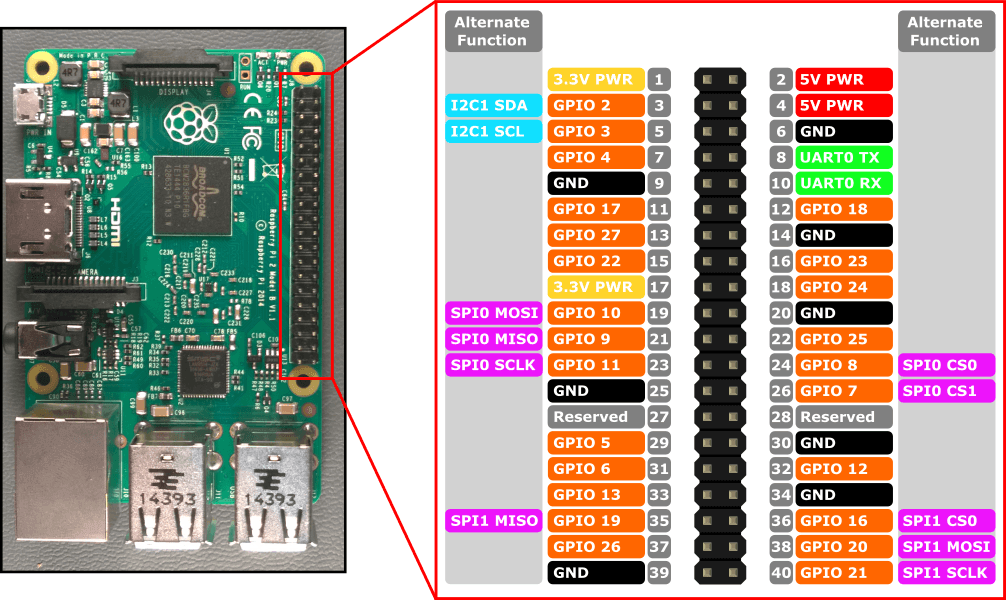
Configuration of Ardupilot
Ardupilot does not send telemetry without specifying the telemetry rates set by the user. In versions below 2.5, this needs to be manually set via the SRX parameters. In versions 2.5 and above, OpenHD handles this automatically.
You can choose different subsets of telemetry information and determine how often you want the Flight Controller (FC) to stream specific sets of data per second (defined in Hz). These parameters are known as SRx_Parameters, where x represents the serial ports using Mavlink in ascending order (e.g., SERIAL0, SERIAL2, SERIAL6 correspond to SR0_, SR1_, and SR6_).
To prevent transmitting telemetry data too frequently over the radio link, select necessary data subsets and find a balance between data update frequency and radio link usage. The following parameters are crucial:
SR1_ADSB=5
SR1_EXT_STAT=2
SR1_EXTRA1=4
SR1_EXTRA2=4
SR1_EXTRA3=2
SR1_PARAMS=10
SR1_POSITION=2
SR1_RAW_CTRL=0
SR1_RAW_SENS=2
SR1_RC_CHAN=2
Using the Config/Tuning -> Full Parameter Tree menu, modify the mentioned settings:
-cc6b9f0d78cf44e5b0b7d6ee0fa6a703.png)
Save the settings and disconnect the Flight Controller.